Managing customers should not feel chaotic. Yet many small businesses still rely on spreadsheets, sticky notes, and manual follow ups. This leads to missed leads, slow responses, and lost sales.
That is where automated CRM comes in.
An automated CRM system helps you manage leads, customers, follow ups, and sales tasks automatically. It saves time, reduces errors, and helps you grow without hiring more staff.
In this guide, you will learn what automated CRM is, how it works, the best use cases, pros and cons, pricing considerations, and how to choose the right system for your business.
What Is Automated CRM
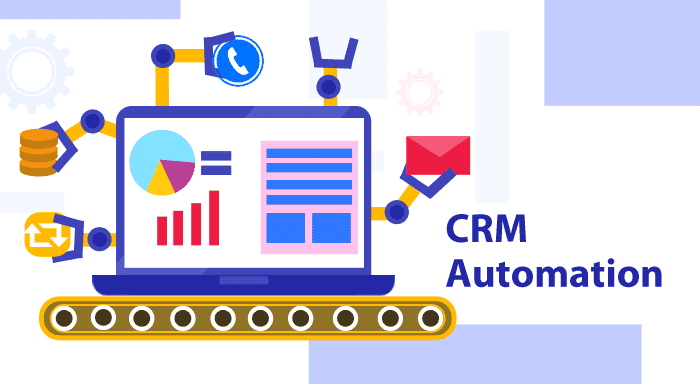
Automated CRM stands for automated customer relationship management. It is software that handles customer related tasks with little or no manual work.
Instead of doing things one by one, the system runs workflows automatically based on rules you set.
What Automated CRM Can Do
An automated software can:
- Capture leads from forms, ads, or emails
- Send follow up emails or messages automatically
- Assign leads to sales reps
- Track calls, emails, and meetings
- Update deal stages in the sales pipeline
- Remind you to follow up
- Generate reports without manual input
The goal is simple. Spend less time on admin work and more time closing deals.
Why Automated CRM Matters for Small Businesses
Small businesses often struggle with time, staff, and consistency. Automated one solves these problems.
Common Problems Without Automated CRM
- Leads forget about you because follow ups are slow
- Customer data is scattered across tools
- Sales teams forget to respond on time
- Marketing and sales are not aligned
- Growth becomes hard to manage
How Automated CRM Fixes This
- Every lead gets instant attention
- All customer data stays in one place
- Follow ups happen on time every time
- Sales pipelines stay organized
- Teams work smarter, not harder
How Automated CRM Works Step by Step
Understanding the workflow helps you use it better.
Step 1: Lead Capture
Leads enter the CRM from:
- Website forms
- Landing pages
- Email campaigns
- Social media ads
- Manual entry
Step 2: Automated Actions
Once a lead enters, the CRM triggers actions like:
- Sending a welcome email
- Assigning the lead to a sales agent
- Adding tags or labels
- Moving the lead to a pipeline stage
Step 3: Lead Nurturing
The system sends follow up emails or messages based on:
- Time delays
- User behavior
- Deal stage
- Interest level
Step 4: Sales Pipeline Automation
Deals move automatically when actions happen such as:
- Email opened
- Call completed
- Payment made
Step 5: Reporting and Insights
Automatic CRM tracks:
- Conversion rates
- Sales performance
- Response times
- Revenue trends
Key Features to Look for in an Automated CRM
Not all CRMs are equal. Focus on features that drive results.
Must Have Features
- Contact and lead management
- Email automation
- Sales pipeline automation
- Task and reminder automation
- Reporting and analytics
- Integration with email and forms
Advanced Features Worth Considering
- SMS or WhatsApp automation
- AI lead scoring
- Workflow builders
- Marketing automation
- Customer support tools
Automated CRM vs Manual CRM
Here is a simple comparison.
| Feature | Manual CRM | Automated CRM |
|---|---|---|
| Data entry | Manual | Automatic |
| Follow ups | Easy to forget | Always on time |
| Lead response | Slow | Instant |
| Scalability | Limited | High |
| Accuracy | Error prone | Consistent |
Key takeaway: Manual CRM works at a small scale. Automatic CRM supports growth.
Pros and Cons of Automated CRM
Advantages
- Saves time and reduces workload
- Improves lead response speed
- Increases sales conversion
- Centralizes customer data
- Reduces human error
- Scales easily as business grows
Limitations
- Learning curve for beginners
- Monthly subscription costs
- Over automation can feel impersonal if not set well
- Requires setup time
Who Should Use Automated CRM
Self-operating CRM is ideal for:
- Small business owners
- Digital marketers
- Online service providers
- E commerce stores
- Sales teams
- SaaS startups
- Agencies and consultants
Who Should Avoid It
- Businesses with very few customers
- One person projects with no sales process
- Companies unwilling to learn new tools
Popular Automated CRM Tools to Consider
Here are examples of widely used automatic CRM platforms.
Entry Level Friendly
- HubSpot CRM
- Zoho CRM
- Freshsales
Marketing Focused
- ActiveCampaign
- Keap
- Mailchimp CRM
Sales Focused
- Pipedrive
- Close CRM
Each tool differs in pricing, automation depth, and ease of use.
Pricing and Cost Considerations
Automatic CRM pricing depends on features and users.
Typical Pricing Ranges
- Free plans with basic automation
- Entry paid plans from $15 to $30 per user per month
- Advanced plans from $50 to $150 per user per month
Hidden Costs to Watch
- Extra charges for contacts
- Automation limits
- Integration fees
- Onboarding costs
Tip: Start small. Upgrade only when you need more automation.
Best Practices for Using Automated CRM
Automation works best when done right.
Keep It Simple at First
- Start with basic workflows
- Automate follow ups and reminders first
- Avoid complex rules early
Personalize Your Automation
- Use names in emails
- Segment leads properly
- Match messages to user intent
Review and Improve Regularly
- Check automation performance
- Remove unnecessary steps
- Update workflows as business changes
Train Your Team
- Make sure everyone understands the system
- Set clear rules for usage
- Keep data clean
Common Mistakes to Avoid
- Automating everything without strategy
- Ignoring customer experience
- Using too many tools at once
- Not tracking results
- Forgetting to test workflows
Automation should help relationships, not replace them.
Automated CRM and SEO Friendly Growth
Automatic CRM supports digital marketing and SEO by:
- Capturing leads from content
- Tracking which pages convert best
- Nurturing organic traffic
- Improving customer lifetime value
It turns website visitors into long term customers.
Final Verdict: Is Automated CRM Worth It
Yes, for most growing businesses, automated CRM is worth it.
It helps you respond faster, stay organized, and close more deals without burning out. The right system pays for itself through saved time and increased sales.
If you are serious about growth, automated CRM is no longer optional. It is a competitive advantage.
If your business is growing and customer management feels messy, now is the time to adopt an automated CRM. Start with a simple tool, test basic automation, and build smarter systems as you grow.
Frequently Asked Questions
What is the main purpose of automated CRM
The main purpose is to manage customer relationships automatically, saving time and improving sales efficiency.
Is automated CRM good for small businesses
Yes. It helps small businesses compete by automating follow ups, lead tracking, and customer management.
Can automated CRM replace human sales teams
No. It supports sales teams but does not replace human interaction.
How long does it take to set up automated CRM
Basic setup can take a few hours. Advanced automation may take a few days.
Is automated CRM expensive
Many tools offer free or affordable plans suitable for beginners and small businesses.
Highlighted Takeaway
Automated CRM helps businesses grow faster by saving time, improving follow ups, and turning leads into loyal customers with less effort.