
Small businesses know social media matters. The problem is not posting. It is posting consistently, tracking results, and doing it all without wasting time or money. Many business owners juggle content creation, customer replies, analytics, and ads while running day to day operations. That is where the right social media marketing tool makes the difference.
This guide breaks down the best social media marketing tool for small businesses, why it works, and how to decide if it fits your needs. If you are problem aware and ready to invest in growth, this article is written for you.
Why Small Businesses Need a Social Media Marketing Tool
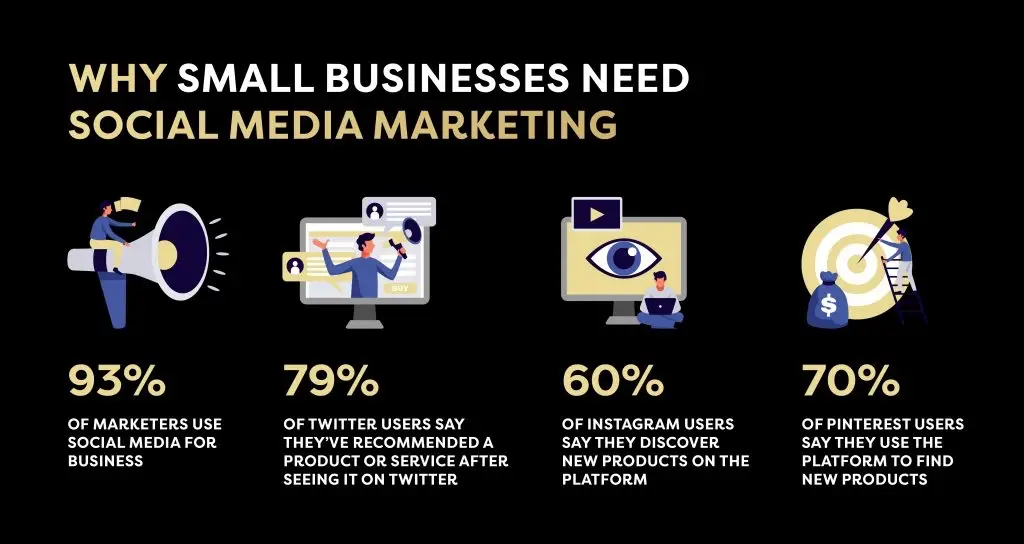
Posting manually on every platform is inefficient and unsustainable. A dedicated tool helps small businesses move from random posting to a clear, measurable strategy.
Key problems these tools solve:
- Inconsistent posting schedules
- Lack of performance tracking
- Time wasted switching platforms
- No collaboration or approval workflow
- Poor ROI visibility
A good social media marketing tool turns social media from a chore into a growth channel.
Best Overall Choice: SocialPilot
After comparing usability, pricing, features, and scalability, SocialPilot stands out as the best social media marketing tool for small businesses.
It is built specifically for small teams, solopreneurs, and growing brands that want professional features without enterprise pricing.
What Is SocialPilot
SocialPilot is an all in one social media management platform that helps businesses schedule posts, analyze performance, manage multiple accounts, and collaborate efficiently.
Supported platforms include:
- X
- Google Business Profile
This wide coverage makes it ideal for businesses that rely on local visibility and organic reach.
Key Features That Matter for Small Businesses
Smart Scheduling and Bulk Publishing
Schedule hundreds of posts in advance using bulk upload. This saves hours every month and ensures consistent posting.
Content Calendar View
Visualize your entire content plan in one place. Drag, drop, and adjust posts easily.
Analytics and Reporting
Track engagement, reach, clicks, and follower growth. Reports are clear and client ready.
Team Collaboration
Assign roles, approve posts, and manage workflows without confusion.
Affordable Scaling
Unlike many tools that increase cost sharply as you grow, SocialPilot scales reasonably.
SocialPilot vs Other Popular Tools
| Feature | SocialPilot | Hootsuite | Buffer |
|---|---|---|---|
| Starting Price | Low | High | Medium |
| Analytics Depth | Strong | Strong | Basic |
| Team Collaboration | Yes | Yes | Limited |
| Bulk Scheduling | Yes | Limited | No |
| Best For | Small businesses | Enterprises | Solo creators |
Highlighted takeaway: SocialPilot offers the best balance between price and professional features.
Pros and Cons
Advantages
- Affordable for small businesses
- Easy to learn and use
- Strong analytics without complexity
- Supports local business profiles
- Reliable customer support
Limitations
- No built in ad management
- Advanced listening features are limited
- Mobile app is functional but basic
These limitations are minor for most small businesses focused on organic growth.
Who SocialPilot Is Best For
SocialPilot is ideal if you are:
- A small business owner managing multiple platforms
- A local business relying on Google Business Profile
- A startup with a small marketing team
- A freelancer managing client accounts
- A beginner marketer wanting professional tools
Who Should Avoid It
- Large enterprises needing deep social listening
- Brands focused heavily on paid social ads
- Businesses needing advanced CRM integration
Pricing Overview
SocialPilot offers tiered pricing designed for growth.
What to expect:
- Entry plans suitable for solopreneurs
- Mid tier plans for small teams
- Higher tiers for agencies and multi brand management
Compared to competitors, the cost per account is significantly lower, making it budget friendly.
Best Practices to Get Results Faster
Use these tips to maximize ROI:
- Plan content weekly instead of daily
- Mix promotional and educational posts
- Track top performing content and repurpose it
- Use analytics to adjust posting times
- Assign clear roles if working with a team
How to grow a small business online
Implementation Tips for Beginners
Start simple. Connect only the platforms you actively use. Schedule one week of content first, review results, then scale to monthly planning.
Avoid over automation. Engagement still requires human interaction.
Final Verdict
If you are looking for the best social media marketing tool for small businesses, SocialPilot delivers where it matters most: simplicity, affordability, and results.
It removes guesswork, saves time, and helps small businesses compete with larger brands without increasing workload.
If you want consistent posting, clear analytics, and more time to run your business, SocialPilot is a smart next step. Start with a trial, test it for one week, and measure the difference.
Frequently Asked Questions
What is the best social media marketing tool for small businesses?
SocialPilot is one of the best options due to its pricing, features, and ease of use.
Is SocialPilot good for beginners?
Yes. The interface is simple, and most users get started in under one hour.
Can one tool manage all social media platforms?
Most major platforms can be managed from one tool, but some features depend on platform limitations.
How much should a small business spend on social media tools?
Most small businesses see strong results spending less than typical enterprise tools while using platforms like SocialPilot.
Conclusion
The right social media marketing tool can change how a small business grows online. Instead of chasing trends, focus on consistency, data, and efficiency. SocialPilot provides that balance and remains one of the smartest investments for small businesses ready to grow.