Data loss, limited device storage, and security risks are problems most individuals and small businesses face daily. Photos disappear with broken phones. Business files scatter across laptops, flash drives, and emails. Teams waste time searching instead of working.
This is where personal cloud storage becomes a practical solution, not just a tech trend. It gives you secure, on-demand access to your files from anywhere while keeping control in your hands.
In this guide, you will learn what personal cloud storage is, how it works, the best tools available, and how to choose the right option for your needs. A beginner guide on data backup strategies
What Is Personal Cloud Storage?

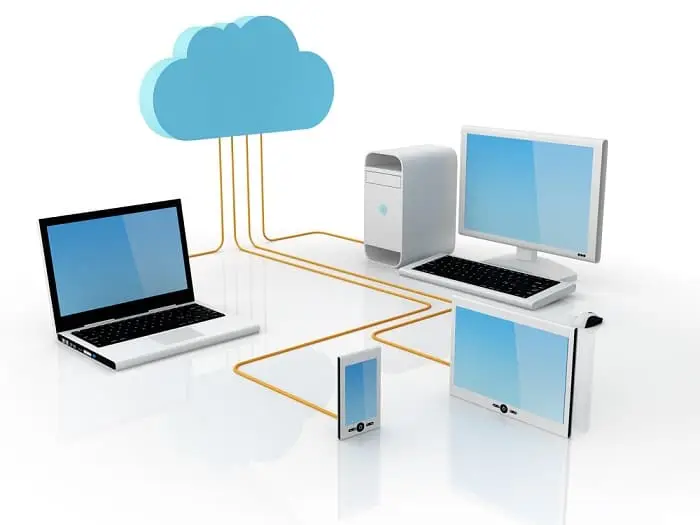
Personal cloud storage is a service that allows you to store files online and access them securely across devices. Unlike traditional external hard drives, cloud storage syncs automatically and protects data from physical damage.
Key benefits at a glance
- Access files from any device with internet
- Automatic backup and version control
- Secure file sharing and collaboration
- Reduced risk of data loss
For freelancers, small businesses, and content creators, private cloud storage has become a core productivity tool.
Why Personal Cloud Storage Matters in 2026
Data usage is growing fast. Remote work, digital marketing, video content, and SaaS tools all rely on cloud-based workflows.
Personal cloud storage helps you:
- Work remotely without carrying hardware
- Share large files instantly
- Protect sensitive business documents
- Scale storage as your needs grow
For small businesses, it is often cheaper and safer than maintaining physical servers.
Best Personal Cloud Storage Solutions Compared
Below is a practical comparison of popular private cloud storage tools used by individuals and small teams.
| Tool | Best For | Free Storage | Key Strength |
|---|---|---|---|
| Google Drive | Collaboration | 15 GB | Seamless Google integration |
| Dropbox | File syncing | 2 GB | Fast and reliable sync |
| OneDrive | Windows users | 5 GB | Microsoft ecosystem |
| pCloud | Lifetime plans | 10 GB | Strong privacy focus |
| Sync.com | Security | 5 GB | Zero-knowledge encryption |
Each option supports private cloud storage, but the right choice depends on your workflow and privacy needs. A comparison post on SaaS productivity tools
How Personal Cloud Storage Solves Common Problems

1. File Access Anywhere
Personal cloud storage lets you access documents, photos, and videos from phone, tablet, or computer without manual transfers.
2. Secure Backup
Most services automatically back up files, reducing the risk of accidental deletion or device failure.
3. Easy File Sharing
Instead of email attachments, you share links with access control, expiration dates, and permissions.
4. Collaboration Made Simple
Real-time editing and shared folders help teams work faster, especially for content and marketing projects.
Pros and Cons of Personal Cloud Storage
Advantages
- Scalable storage without hardware costs
- Automatic updates and backups
- High-level encryption and security
- Cost-effective for small businesses
Limitations
- Requires internet access
- Free plans have storage limits
- Monthly fees for advanced features
- Privacy depends on provider policies
Who Should Use Personal Cloud Storage?
Personal cloud storage is ideal for:
- Freelancers and remote workers
- Small business owners
- Digital marketers and content creators
- Students managing large files
- Anyone needing secure backups
Who Should Avoid It
- Users with no internet access
- Businesses with strict on-premise data requirements
- Those unwilling to pay for premium security features
Pricing and Cost Considerations
Most personal cloud storage tools follow a freemium model.
Typical pricing ranges
- Free plans: 2 GB to 15 GB
- Personal plans: $2 to $10 per month
- Business plans: $10 to $25 per user per month
- Lifetime plans available with some providers
When choosing, consider long-term storage needs, security features, and customer support.
Best Practices for Using Personal Cloud Storage
- Enable two-factor authentication
- Organize files using clear folder structures
- Regularly review shared links
- Use encryption for sensitive documents
- Avoid mixing personal and business files
Highlighted takeaway: Security and organization matter more than storage size.
Final Verdict: Is Personal Cloud Storage Worth It?
Yes. Personal cloud storage is one of the most practical digital tools available today. It improves productivity, protects valuable data, and supports modern remote work.
For small businesses and beginner marketers, it offers enterprise-level reliability without complex setup. Choosing the right provider depends on your budget, privacy needs, and workflow.
If you are still relying on flash drives or local storage, now is the time to upgrade. Start with a free personal cloud storage plan, test your workflow, and scale when ready. Your files deserve better protection and accessibility.
Frequently Asked Questions
What is the difference between personal and business cloud storage?
Personal cloud storage is designed for individual use, while business plans offer team management, admin controls, and compliance tools.
Is personal cloud storage secure?
Yes, most providers use encryption and secure data centers. For sensitive data, choose services with zero-knowledge encryption.
Can I use personal cloud storage for business files?
Yes, many freelancers and small businesses use personal plans, but growing teams should consider business upgrades.
How much storage do I need?
Most users start with 100 GB to 1 TB depending on files like videos, designs, or backups.
Conclusion
Personal cloud storage is no longer optional. It is a smart, scalable solution for protecting data, improving collaboration, and supporting digital growth. Choose wisely, follow best practices, and let your storage work for you, not against you.